The Problem With Regex for URL Parsing
URL structures are inconsistent in the real world. You'll have:
https://developers.google.com/path
http://google.com
developers.google.com (no protocol)
https://www.google.co.uk/path?ref=123
A regex that handles all of these reliably is either long and brittle, or short and wrong. Either way, it breaks the moment a new edge case shows up in your data.
BigQuery's NET functions handle this at the engine level. They're battle-tested, consistent, and significantly faster on large datasets than regex pattern matching.
Two Functions You Need to Know
NET.HOST() — Extract the Full Subdomain + Domain
SELECT NET.HOST('https://developers.google.com/search/blog/2008/09/dynamic-urls-vs-static-urls')
SELECT NET.HOST('https://developers.google.com/search/blog/2008/09/dynamic-urls-vs-static-urls')
SELECT NET.HOST('https://developers.google.com/search/blog/2008/09/dynamic-urls-vs-static-urls')
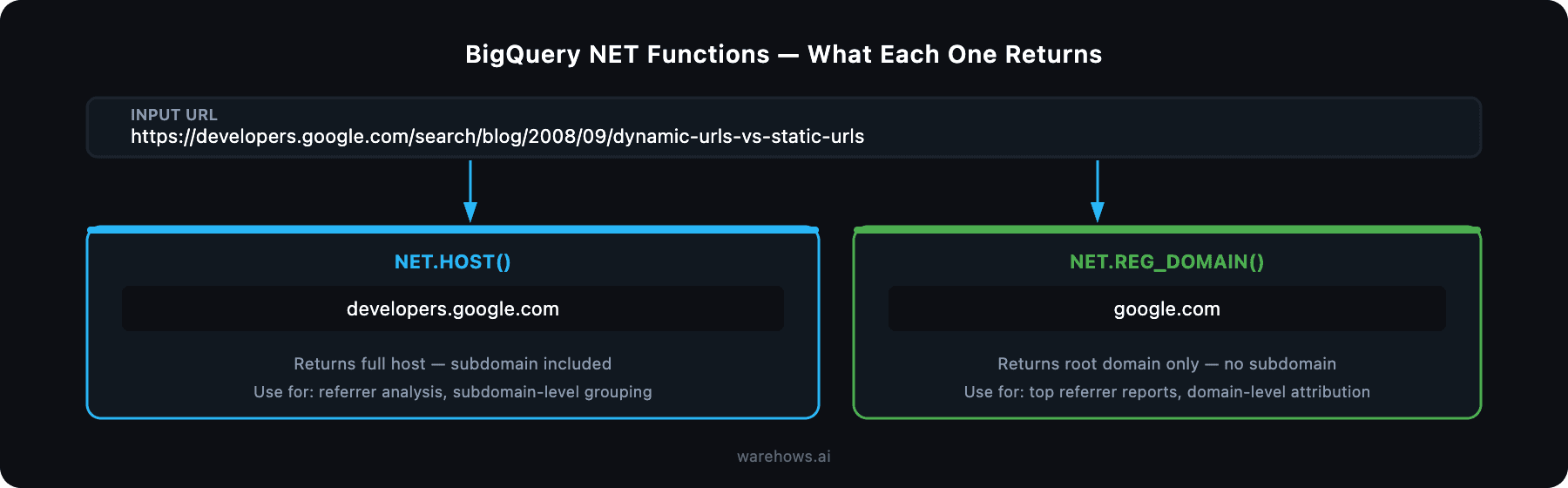
This gives you the full host — subdomain included. Use this when you need to distinguish between developers.google.com and support.google.com as separate traffic sources or referrers.
When to use it:
Referrer analysis where subdomains represent distinct products or teams
Grouping traffic by host for SaaS platforms with subdomain-per-customer architectures
De-duplication when the same domain appears with and without www
NET.REG_DOMAIN() — Extract the Root Domain Only
SELECT NET.REG_DOMAIN('https://developers.google.com/search/blog/2008/09/dynamic-urls-vs-static-urls')
SELECT NET.REG_DOMAIN('https://developers.google.com/search/blog/2008/09/dynamic-urls-vs-static-urls')
SELECT NET.REG_DOMAIN('https://developers.google.com/search/blog/2008/09/dynamic-urls-vs-static-urls')
This strips everything except the registrable domain — no subdomain, no path, no query string. Use this when you want to group all traffic from Google properties together regardless of which subdomain it came from.
When to use it:
Building domain-level traffic attribution reports
Identifying top referral domains across a large URL dataset
Cleaning up raw UTM source fields that contain full URLs instead of domain names
Practical Example: Cleaning a Raw URL Column in a Traffic Table
In most web analytics pipelines, your raw event table will have a page_url or referrer_url column full of long, messy URLs. Here's how you'd clean it in a dbt model or a BigQuery query:
SELECT
  raw_url,
  NET.HOST(raw_url)        AS host,
  NET.REG_DOMAIN(raw_url)  AS root_domain
FROM
  your_project.analytics.raw_sessions
WHERE
  raw_url IS NOT NULL
LIMIT 100
SELECT
  raw_url,
  NET.HOST(raw_url)        AS host,
  NET.REG_DOMAIN(raw_url)  AS root_domain
FROM
  your_project.analytics.raw_sessions
WHERE
  raw_url IS NOT NULL
LIMIT 100
SELECT
  raw_url,
  NET.HOST(raw_url)        AS host,
  NET.REG_DOMAIN(raw_url)  AS root_domain
FROM
  your_project.analytics.raw_sessions
WHERE
  raw_url IS NOT NULL
LIMIT 100
Run this before building any traffic aggregation model. It saves you from joining on mismatched URL formats downstream — and it's the kind of thing that causes "which report is right?" conversations when it's missing.
A Note on NULL Handling
Both functions return NULL if the input URL is malformed or missing a recognizable domain. That's actually useful — it lets you filter or flag bad rows explicitly rather than silently producing wrong output.
SELECT
  raw_url,
  NET.REG_DOMAIN(raw_url) AS root_domain,
  CASE
    WHEN NET.REG_DOMAIN(raw_url) IS NULL THEN 'unparseable'
    ELSE 'clean'
  END AS url_status
FROM
SELECT
  raw_url,
  NET.REG_DOMAIN(raw_url) AS root_domain,
  CASE
    WHEN NET.REG_DOMAIN(raw_url) IS NULL THEN 'unparseable'
    ELSE 'clean'
  END AS url_status
FROM
SELECT
  raw_url,
  NET.REG_DOMAIN(raw_url) AS root_domain,
  CASE
    WHEN NET.REG_DOMAIN(raw_url) IS NULL THEN 'unparseable'
    ELSE 'clean'
  END AS url_status
FROM
Add this as a data quality check in your dbt tests. If more than a small percentage of your URLs are returning NULL, it's worth investigating the upstream source.
Where This Fits in a Real Analytics Stack
In a properly structured data pipeline, URL parsing like this belongs in the staging layer — not in your dashboard queries. Parse once, store clean, report from trusted models.
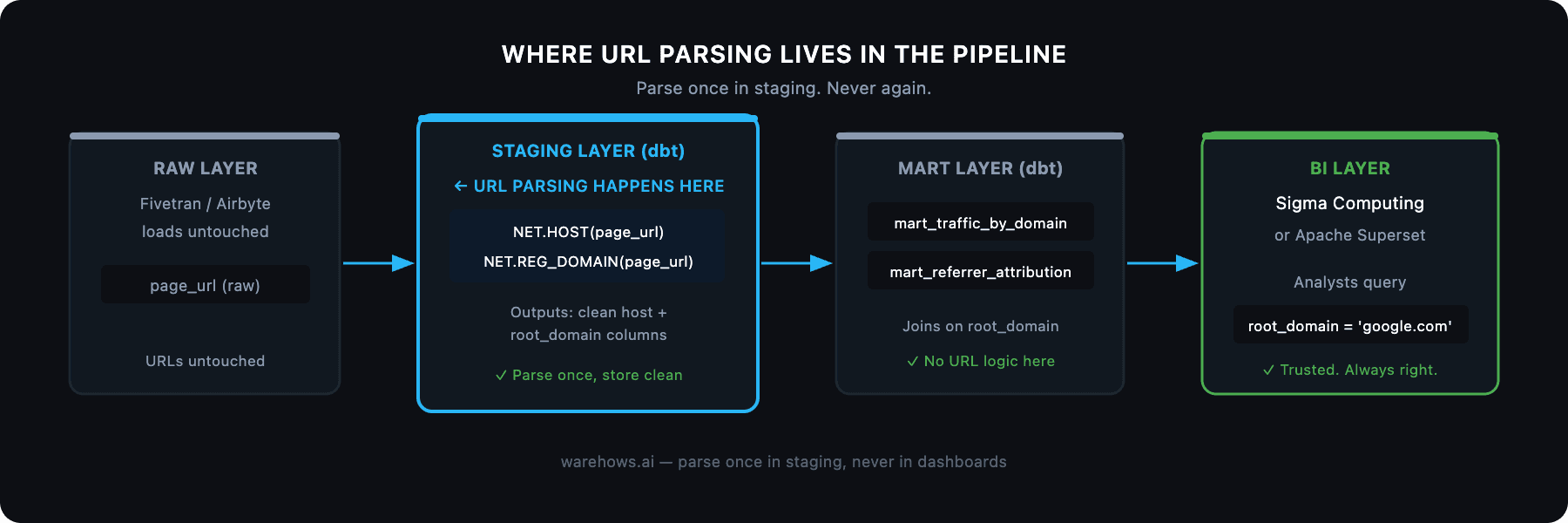
The pattern we use at Warehows:
Raw events land in Snowflake or BigQuery via Fivetran or Airbyte — URLs untouched
Staging models (dbt) apply NET.HOST() and NET.REG_DOMAIN() to create clean host and root_domain columns
Mart models join on those clean columns to build traffic attribution, referrer reports, and campaign analytics
Sigma Computing or Superset reads from the mart — no URL parsing logic anywhere near the BI layer
This means your analysts never touch a URL string. They query root_domain = 'google.com' and get a reliable answer every time.
Full NET Functions Reference
BigQuery's NET namespace has more than just these two. The full documentation is at cloud.google.com/bigquery/docs/reference/standard-sql/net_functions. Other useful ones include NET.IP_FROM_STRING() and NET.IP_TO_STRING() for IP address handling in network analytics.
The Bigger Point
A two-function fix for URL parsing is a small thing. But it's representative of a larger pattern: the teams that build reliable analytics infrastructure don't write clever code — they use the right primitives and standardize them across the stack.
The firms we've worked with that have the cleanest data foundations are the ones that made boring, consistent decisions early. NET.REG_DOMAIN() in the staging layer instead of regex in the dashboard query is exactly that kind of decision.
If your team is still fighting messy URLs, inconsistent metrics, or pipelines held together by manual exports, that's a fixable problem. We've done it 50+ times.
Book a free discovery call at warehows.ai — we'll tell you exactly what's broken and what it would take to clean it up.